
Monthly
$12.90per month
Pay month to month, no commitment
- Full editor
- Fonts and designs library
- Your own website on Google
Online embroidery software
Meus Bordados turns text and artwork into a machine-ready file, in DST, PES or JEF, right in your browser. Preview it in 3D before you hoop the fabric, and keep orders, customers and payments in the same place.
No credit card. Nothing to install. Cancel anytime.
Caps, T-shirts, towels, scrubs, uniforms: most orders are lettering. With the right software you handle them on the spot, your way, and earn more from the same hours.
No course and no complicated setup. Stitch settings come tuned for lettering.
The name, phrase or date your customer asked for.
Use library fonts or your own, and combine with a ready-made design if you like.
See the satin stitch, the thread color and the real size in the hoop.
Save as DST, PES or JEF and load it from a USB stick.
New · Artificial intelligence
Send the photo of the pet, the person or that blurry logo. The AI redraws it with flat colors, and Instant digitizing turns it into stitches, keeping the colors, the details and the drawing lines.

Just as it arrived on WhatsApp, with background, shadows and all.
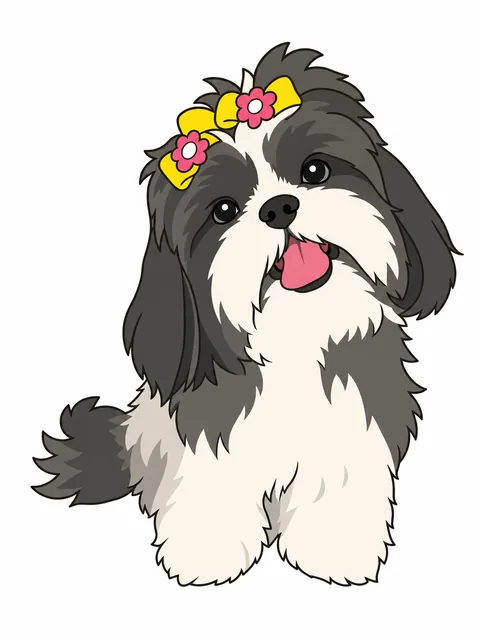
With Prepare with AI, it becomes a few-color illustration, without background, ready to stitch.
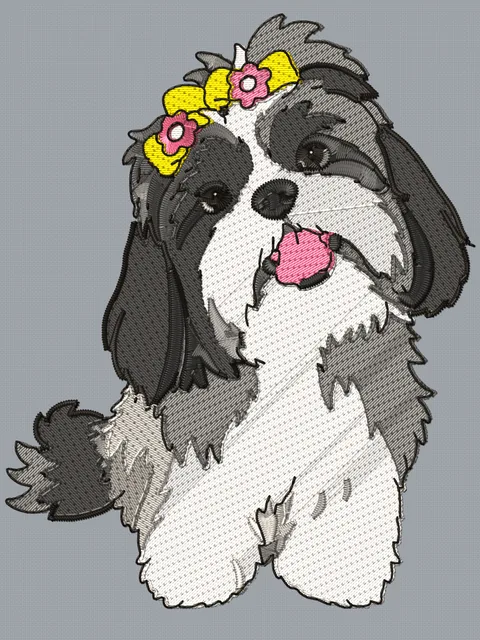
Instant digitizing: illustration creates the stitch areas and the lines. Check it in 3D and download it for your machine.
Each image generated by the AI uses 1 credit; if the AI fails, the credit comes back. Credits are bought in packs in your dashboard. Turning the image into embroidery is unlimited and included in every plan.
Everything you need to create, adjust and sell custom embroidery, in a single subscription.
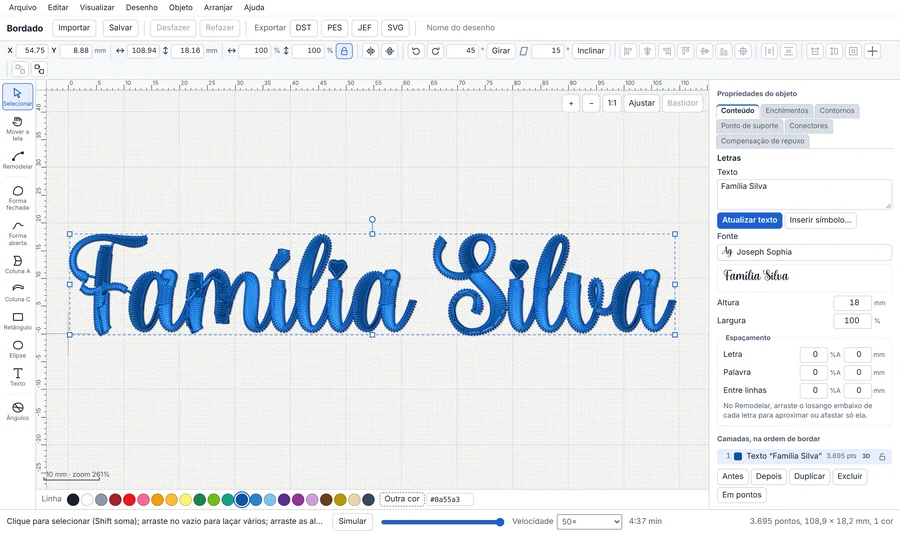
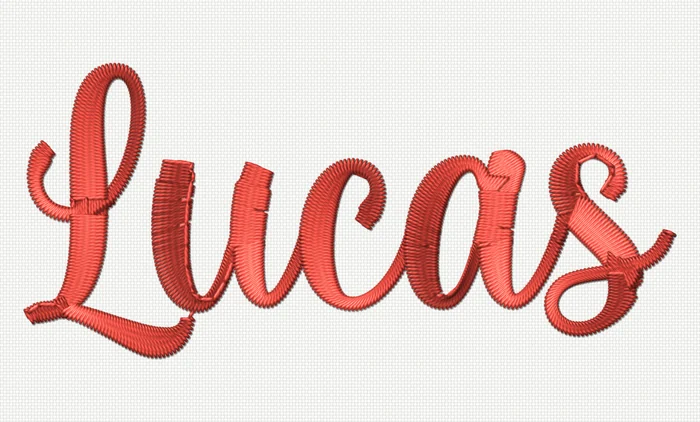
The satin stitch follows the stroke of every letter, the way professional software does. Even script fonts come out with full curves and clean joins.
Open the library inside the editor, pick the design in the right size for the garment and combine it with your customer’s name. You can also import your own DST, PES and JEF files and keep your own designs.
Know what to stitch today, what has been paid and who still owes you. Orders move across columns from quote to delivery, and your books keep themselves.
Build your brand’s page in minutes, with your city, photos of your work, services and a WhatsApp button. It comes ready for local searches.
Traditional embroidery software was built for another era: a pricey license, installed on one computer, and nothing beyond the design.
| Traditional desktop software | Meus Bordados | |
|---|---|---|
| Getting started | Buy a license and install it | Create an account and try it free for 7 days |
| Computer | Usually Windows only, on one machine | Windows, Mac or Linux, in the browser |
| Cost | A big one-time license fee | A subscription that fits your month |
| Updates | New versions sold separately | Always the latest version, at no extra cost |
| Preview before stitching | Basic preview | 3D preview of stitches and thread |
| Your files | Stuck on that computer | In the cloud, on any computer |
| Orders and bookkeeping | A separate notebook or spreadsheet | Built into the same dashboard |
| Shop website | Not included | Included |
Start with a 7-day free trial, no credit card. Then choose how you’d like to pay: every plan includes everything.
$12.90per month
Pay month to month, no commitment
$29.90every 3 months
Works out to $9.97 a month · save 23%
$99.90per year
Works out to $8.33 a month · save 35%
Every plan includes
Didn’t find your answer? Create a free account and test it with your own orders.
No. Meus Bordados runs in your computer’s browser (Chrome, Edge, Firefox or Safari). Log in with your email and password from anywhere; your files are saved to your account.
Yes. Because Meus Bordados runs in the browser, it works the same on Mac, Windows and Linux, with no emulator and nothing to install. It’s a good option if you have a Mac and can’t find compatible embroidery software.
The software exports DST, PES and JEF. Those are the formats read by Brother and Baby Lock (PES), Janome and Elna (JEF), and Tajima, Barudan and most commercial machines (DST). If your machine reads one of them, it works.
Open the editor, import the PES file and download it again as DST (the same goes for JEF). The software reads the stitches in the file, so the design isn’t re-digitized. Before downloading you can change colors, resize it and add a name.
No. Create your account and use everything for 7 days. You only enter a card if you want to continue.
There are monthly, quarterly and yearly plans, all with the same features; longer plans cost less per month. Current prices, in US dollars or Brazilian reais, are on the pricing page.
Create your account in under a minute and test it with your shop’s real orders.
Start your 7-day free trialNo credit card. Nothing to install. Cancel anytime.